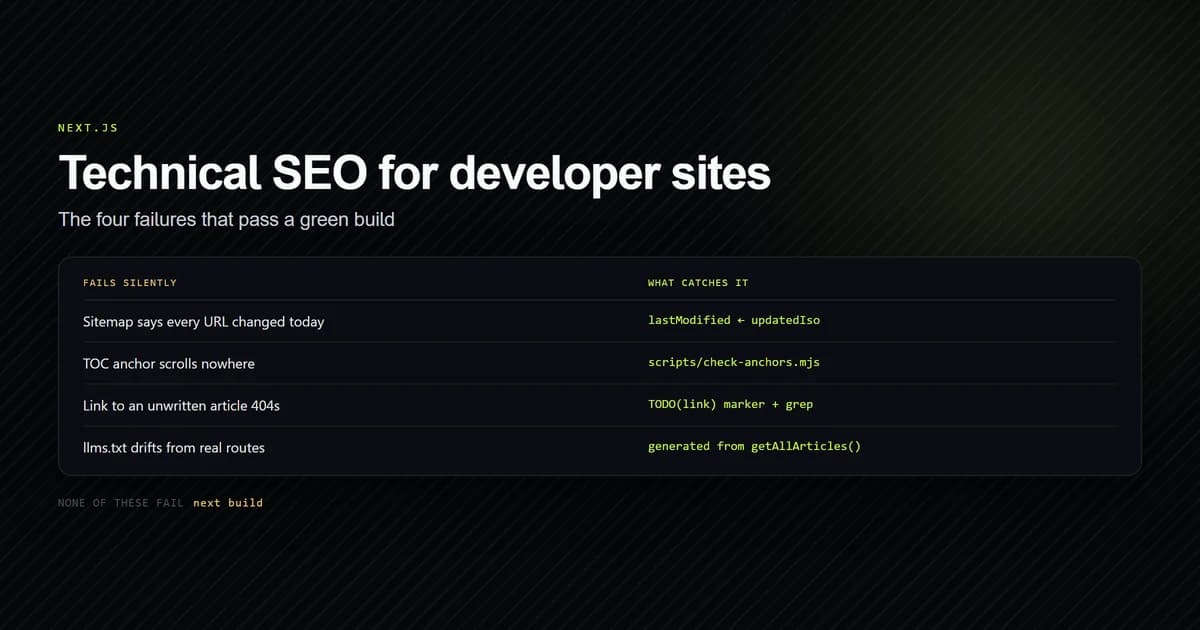
Technical seo nextjs work splits cleanly in two: the parts the framework already does, and the parts that break silently while your build stays green. The first group needs almost no attention — the Metadata API, sitemap.ts and robots.ts cover it. The second group is where developer blogs actually lose traffic, because nothing fails, nothing warns, and the damage is only visible in Search Console weeks later. This guide covers four of those failures, with the code from this site, which is a Next.js 15 App Router build with 19 MDX articles.
Key takeaways
- Next.js handles metadata, sitemap and robots generation; none of it validates that what you produced is correct.
- A sitemap
lastModifiedderived from build time marks every URL as changed on every deploy, which makes the field worthless. - Heading anchors generated by
rehype-slugstrip dots and punctuation, so a hand-written table-of-contents href fails silently — the build passes and the link scrolls nowhere. - With
dynamicParams = false, an internal link to an article you have not written yet is a live 404, not a soft failure. - Serving
llms.txtis cheap, but hand-maintaining it guarantees drift — generate it from the same source your sitemap uses.
The short answer for a developer blog
Do these four things and you have covered more than most developer blogs ever do.
- Generate every discovery file from one source of truth. Sitemap,
robots.txtandllms.txtshould all read the same article list, so they cannot disagree about what exists. - Drive
lastModifiedfrom content dates, never fromnew Date()at build time. - Write a check for whatever fails silently. In an MDX site that is anchors first — it is the only class of breakage with no runtime symptom at all.
- Never publish an internal link to a page you have not written. Under static params it is a 404, and a 404 in your own body copy is worse than no link.
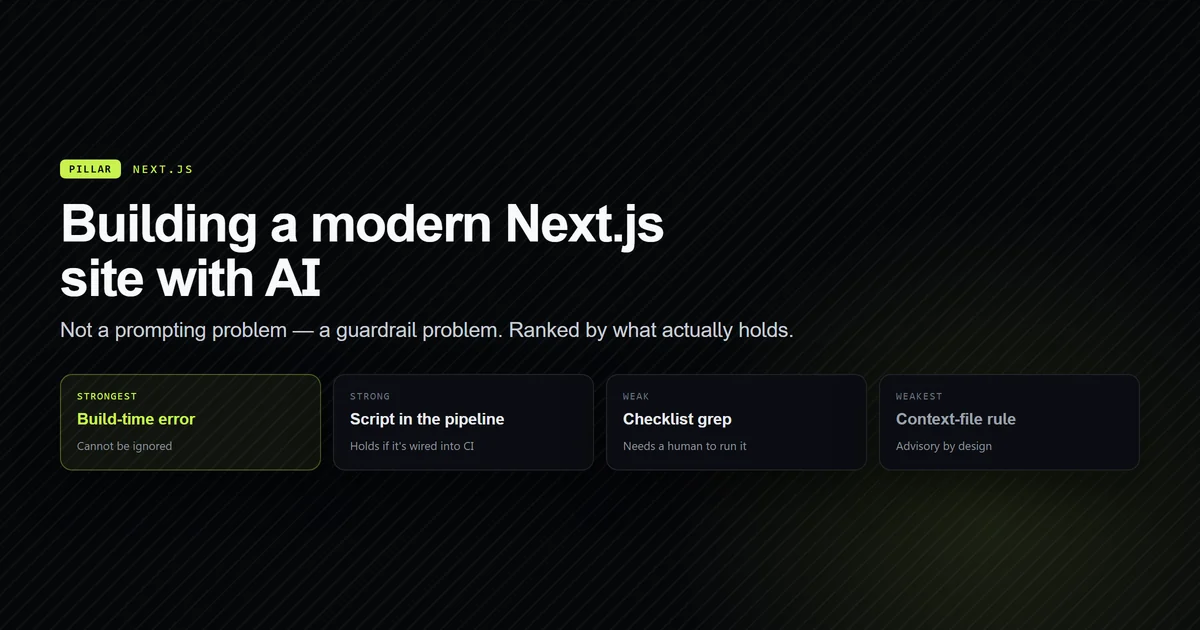
The build itself — components, routing, MDX pipeline — is a separate subject, covered in building a modern Next.js site with AI assistance. This guide is only about being found.
Technical seo nextjs beyond the defaults
Start by being clear about what you are not responsible for. Next.js 15's App Router already gives you server-rendered HTML with real content in it, the Metadata API for titles, descriptions and Open Graph tags, file-based sitemap.ts and robots.ts, and clean URL segments. Most "technical SEO for Next.js" checklists are a list of those defaults presented as work.
The work is everywhere the framework has no opinion. Four categories, in the order they cost you traffic:
- Freshness signals that lie. Your sitemap says everything changed today, so nothing did.
- Structured data that is incomplete rather than absent. A missing
Articleblock is obvious; aBreadcrumbListthat disagrees with your visible breadcrumb is not. - Internal links that resolve to nothing. Either a 404, or an anchor that goes nowhere.
- Machine-readable entry points you have not served.
llms.txtis the current example.
Each of the sections below is one of those, with what this repository actually does about it.
Nextjs sitemap seo starts with lastModified
The nextjs sitemap seo question people ask is "how do I generate a sitemap," which the framework answers with a single file. The question that matters is what you put in lastModified, and the common answer is wrong.
Here is the article branch of this site's sitemap:
// Only published MDX articles — the single source of truth for what exists.
// Anything without backing content would 404, which is worse than being absent.
const articles = getAllArticles().map(({ meta }) => ({
  url: `${site.url}/${meta.categorySlug}/${meta.slug}`,
  lastModified: new Date(meta.updatedIso),
}));
meta.updatedIso is a frontmatter field on each article. It moves when the content moves and not otherwise, so the timestamp means something. The alternative — lastModified: new Date() — stamps every URL with the deploy time, and after a few deploys a crawler has learned that your freshness signal carries no information.
That design has a cost, and it is a discipline cost rather than a code one: every edit to a published article has to bump updatedIso by hand, or the sitemap under-reports. Adding an internal link to an older article counts. This site's editorial rules make bumping it non-optional on any substantive edit, which is the only thing that keeps the field honest.
There is a second decision in the same file worth copying. Tag routes are deliberately excluded:
// Tag routes are intentionally absent: no tag taxonomy backs them yet, so
// advertising `/tags/*` here would point crawlers at empty pages.
The routes exist and render. They are just not worth a crawler's budget yet, so they are not advertised. Excluding thin pages you have shipped is as much a part of sitemap work as including good ones — the same reasoning excludes categories with no published articles.
JSON-LD belongs in two layers, not one
Structured data is where developer blogs usually do half the job. The instinct is to put every JSON-LD block in the root layout, which produces an Article schema on your about page.
This site splits it. Site-level identity lives in lib/schema.ts and emits Organization, WebSite with a SearchAction, plus Person and ProfilePage for the author. Page-level types are emitted by the routes that can actually populate them: app/[category]/[slug]/page.tsx emits Article, BreadcrumbList and FAQPage, and app/[category]/page.tsx emits its own BreadcrumbList.
The rule that falls out is simple. A schema type belongs at the level that owns the data it describes. WebSite is true everywhere, so it goes in the layer that renders everywhere. FAQPage is only true where FAQs exist, so it goes in the article route — and on this site it is generated from the faqs frontmatter field that also renders the visible accordion, which is what guarantees the schema and the page agree. Hand-writing an FAQ in the body and a FAQPage block separately is how the two drift apart.
Verifying it is a grep, not a service:
grep -o '"@type":"Article"' .next/server/app/next-js/technical-seo-nextjs.html
# → "@type":"Article"
Running that against the built output confirms the block survived rendering, which a validator pointed at a URL cannot tell you until after you deploy.
The anchor mismatch that fails silently
This is the failure worth building a tool for, because it is the only one with no symptom at all.
Every article on this site carries a toc array in frontmatter, and each entry has an href pointing at a heading ID. Those IDs are generated by rehype-slug from the heading text. The generation strips punctuation, and dots are the trap:
## What CLAUDE.md actually does
      ↓
#what-claudemd-actually-does        ← the dot is gone
#what-claude-md-actually-does       ← what you would write by hand
Write the second one and nothing happens. The build passes, the page renders, the sidebar link is present and clickable, and clicking it scrolls nowhere. There is no console error and no failed check, because from the framework's point of view nothing is wrong — it is an anchor to an ID that does not exist, which is legal HTML.
The fix is a build-gating script that reproduces the ID generation rather than approximating it:
Why this exists: `toc` hrefs in frontmatter must match the IDs `rehype-slug`
generates from heading text, and a mismatch fails **silently** — the sidebar
link scrolls nowhere and nothing warns at build time. This reproduces the exact
ID generation (`github-slugger`, the same package `rehype-slug` uses, pinned to
the same version) so the check is authoritative rather than approximate.
The pinning detail is the part that matters. A regex that lowercases and hyphenates gets the common cases right and diverges on exactly the punctuation that causes the bug. Using the same slugger at the same version means the check cannot disagree with the renderer.
It also enforces two heading rules that have no runtime guard — no # H1 in the body, since the H1 comes from frontmatter, and no #### or deeper, which is unstyled here. It exits non-zero, so it gates a build:
npm run check:anchors
# → 19/19 article(s) passed.
Nineteen for nineteen, and it has caught mistakes on articles written since. If you take one idea from this guide, take this one: find the thing in your stack that breaks without complaining, and write the check for that first. Wiring it into the pipeline alongside typecheck and build is covered in connecting AI tools to your deployment pipeline.
An internal link to an unwritten page is a 404
Both dynamic article routes here set dynamicParams = false:
export const dynamicParams = false;
That is the right choice for a content site — it means the set of valid URLs is exactly the set of files, and anything else 404s instead of attempting a render. It also creates a trap for editorial work, because the natural way to write an article is to link to the related piece you are planning to write next week. That link is not a placeholder. It is a live 404 in your own body copy, and internal 404s are worse than missing links: they waste crawl budget and they signal a site that does not check itself.
The convention this site uses is an MDX comment marking the intent, resolved when the target ships:
{/* <!-- TODO(link): #20 AI Coding Tool Pricing: The Complete Breakdown --> */}
The sentence gets written without the link, the comment records what should eventually point where, and a grep over content/ finds every outstanding one whenever a new article ships.
As this article was published, seven of the site's articles carried that marker pointing at a single unwritten page. That is the kind of debt that is invisible without a convention — those would otherwise be seven dead links, or seven links that were never added and never remembered. Making the marker greppable is what turns "I should link that later" into a list you can actually work through on publish day.
Serving llms.txt for AI search
llms.txt is a curated entry point for AI agents, in the same family as robots.txt but aimed at readers that budget tokens rather than crawl budget. Serving one is cheap. Hand-maintaining one is the mistake.
This site generates it as a route handler for the same reason the sitemap is generated:
/**
 * A route handler rather than a file in `public/`, for the same reason
 * `sitemap.ts` and `robots.ts` are generated: a hand-maintained copy drifts, and
 * a stale link here points an agent at a 404. Everything below is derived from
 * the modules that define the routes.
 */
export const dynamic = "force-static";
force-static matters: nothing in the output varies per request, so it should be a static asset on the CDN rather than a function invocation on every fetch. And the article list comes from getAllArticles() — the same call the sitemap makes — so the two files cannot disagree about what exists.
One structural detail from the spec is worth knowing: ## Optional is a reserved section heading, marking content an agent may skip when working in a shorter context. That is a genuinely useful primitive and almost nobody uses it. Put your legal pages there, not your best articles.
What AI writing actually does for SEO
The ai content seo developer blog question is usually framed as whether AI-written content ranks. That is the wrong frame. Google's helpful-content guidance targets content that lacks first-hand experience — the production method is not what it measures.
What an AI pipeline is genuinely good at here is the mechanical layer, and this site's own workflow is the example. There is a real skill at .claude/skills/write-article/SKILL.md — how skills and slash commands work covers the mechanism — that encodes the article structure, the MDX constraints, the frontmatter schema and the QA gates, so none of that is re-derived per article. It injects live repository state into its own prompt, so the model sees which routes actually exist rather than guessing.
What it does not do is supply the artifact. Every article here needs at least one thing a model could not have generated — a real config file, a real command output, a real failure — and that still comes from work someone did. The pipeline makes the surrounding 80% fast and consistent. It cannot make the 20% that earns the ranking.
There is one honest cost worth naming. A faster pipeline produces more articles, and more articles produce more internal-link debt, more updatedIso bumps to remember, and more anchors to keep valid. The checks in this guide exist because the volume made manual verification unrealistic — and if you are weighing whether that throughput is worth the subscription, what AI coding assistants actually cost is the arithmetic.
Common mistakes on developer blogs
- Stamping
lastModifiedwith the build time. The single most common sitemap mistake, and it silently disables the one freshness signal you control. - Putting all JSON-LD in the root layout. Produces
Articleschema on pages that are not articles, and aFAQPagewith no FAQs. - Hand-writing table-of-contents anchors. They will be right until a heading is reworded, and then they will be wrong with no warning at all.
- Duplicating FAQ content between the body and the schema. Generate both from one field or they drift, and mismatched schema is worse than none.
- Linking to articles you are about to write. With static params that is a live 404. Leave a marked comment and resolve it on publish day.
- Advertising thin routes in the sitemap. If a page is not worth reading yet, keep it out — shipping a route and listing a route are separate decisions.
- Treating a green build as verification. Every failure in this guide passes
next build. That is precisely why each one needed its own check.
Conclusion
Take the four checks rather than the four fixes. Drive lastModified off content dates and make bumping it part of editing. Emit each schema type from the layer that owns its data. Write a validator for whatever in your stack fails silently — for MDX that is anchors, and reproduce the generation exactly rather than approximating it. And treat an internal link to an unwritten page as the 404 it is. If you are starting from an empty repository instead, the full build guide is the place to begin; come back here once you have something worth indexing.
Frequently asked questions
Does Next.js handle technical SEO automatically?
How should lastModified work in a Next.js sitemap?
Why do my table-of-contents anchor links scroll nowhere?
Should a developer blog serve an llms.txt file?
Does AI-written content rank on a developer blog?

Muhammad Kashif
Founder and editor of Devventa, covering AI coding assistants, Next.js and the modern AI development stack.