GitHub Copilot Pro costs $10 a month and includes $15 of model usage. Cursor Pro costs $20 and includes $20. That inversion — the cheaper seat returning more than it costs, the pricier one returning exactly what it costs — is the single most useful fact in any AI coding tools pricing comparison right now, and it only became checkable this quarter, because Copilot and Cursor have both started denominating included usage in dollars rather than in credits, requests, or multiples of an undisclosed base. Every figure below was read from the vendor's own page on August 4, 2026, and is recorded in this repository so it can be re-checked.
Key takeaways
- Copilot and Cursor now both publish included model usage in dollars, which makes them directly comparable on identical units for the first time.
- Copilot Pro+ and Cursor Pro Plus both include $70 of model usage; Copilot charges $39 for it and Cursor charges $60, a difference of $252 a year.
- Only $39 of Copilot Pro+'s $70 is guaranteed — GitHub splits included usage into base credits equal to your seat price plus a "flex allotment" it states "may change over time."
- Anthropic's own documentation puts real Claude Code usage at "$150-250 per developer per month," which is five to twelve times the $20 seat price and the figure most comparisons omit.
- The cheapest AI coding assistant is bring-your-own-key below roughly $10 a month of consumption and Copilot Pro above it, because a $10 seat that includes $15 of usage undercuts paying for tokens directly.
Every price on this page, side by side
Six vendors, every figure read on August 4, 2026 from the page named in the last section.
| Tool | Entry paid seat | Included model usage |
|---|---|---|
| GitHub Copilot | $10/mo Pro | $15/mo in credits |
| Cursor | $20/mo Pro | $20/mo third-party models |
| Claude Code | $20/mo Claude Pro | Allowance, not dollar-denominated |
| Devin Desktop | $20/mo Pro | Daily and weekly quota |
| Cline | $0 | None — you supply the key |
| Aider | $0 | None — you supply the key |
The seat prices cluster tightly at $10 to $20, which is why comparisons built on them all reach the same non-answer. The included-usage column is where the products actually differ, and three of the six do not express it in a unit you can budget against at all.
How to read an AI coding tools pricing comparison
The useful question is not what a seat costs. It is how many dollars of model usage the seat returns, because model usage is the thing you actually consume and the thing you will be billed for once the allowance runs out.
Two vendors now answer that directly.
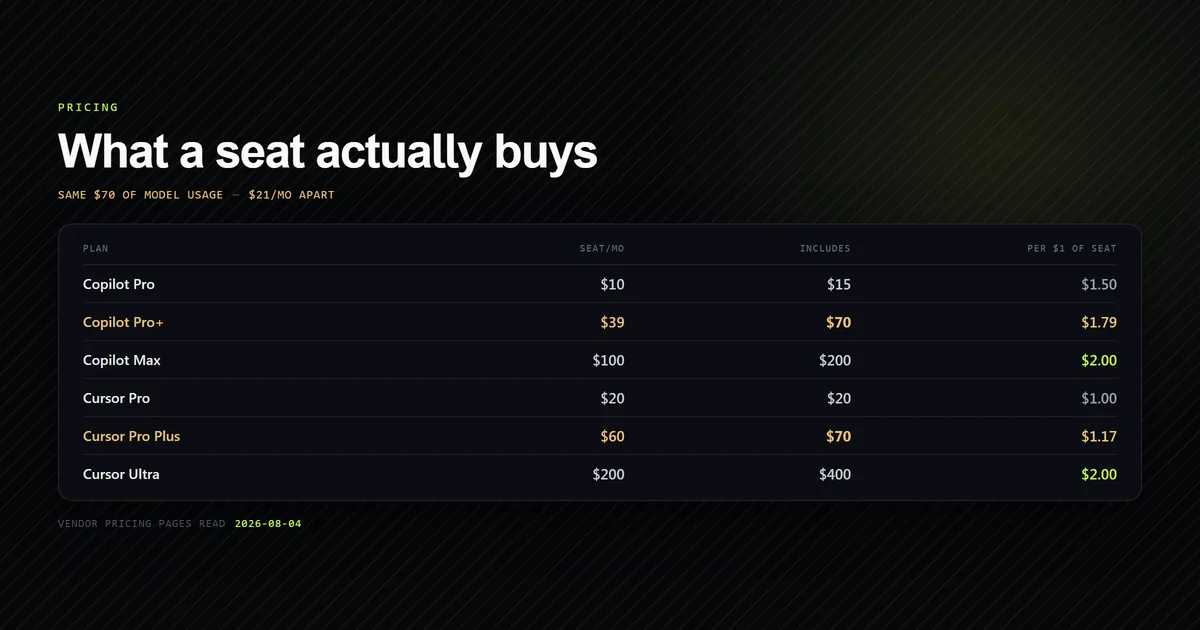
| Plan | Seat/mo | Included usage | Usage per $1 of seat |
|---|---|---|---|
| Copilot Pro | $10 | $15 | $1.50 |
| Copilot Pro+ | $39 | $70 | $1.79 |
| Copilot Max | $100 | $200 | $2.00 |
| Cursor Pro | $20 | $20 | $1.00 |
| Cursor Pro Plus | $60 | $70 | $1.17 |
| Cursor Ultra | $200 | $400 | $2.00 |
Both ladders converge on exactly $2.00 of usage per seat dollar at the top and diverge sharply at the bottom. That is a real pattern rather than a coincidence of rounding: both vendors subsidise their highest tier at the same rate and price their entry tier completely differently.
The Copilot column carries a qualification that matters more than the ratio. GitHub's plans page splits included usage into two rows. Base credits are exactly equal to the seat price — $10, $39, and $100 respectively. Flex allotment is the remainder — $5, $31, and $100 — described on the page as "Variable additional usage on top of your base," with the explicit warning that "Flex allotments may change over time."
So Copilot Pro's headline $15 is $10 you are contractually buying and $5 the vendor has reserved the right to withdraw. At Pro+ the split is starker: $39 guaranteed against $31 discretionary. Every "Copilot includes more than you pay for" claim, including the one at the top of this article, rests entirely on the discretionary half.
Cursor makes no equivalent split. Its documentation states one figure per tier, so the $20, $70, and $400 are the whole of what is published. That does not make them permanent, but it does mean there is no disclosed variable component to discount.
Cursor vs Copilot pricing at the same usage level
The cursor vs copilot pricing question usually gets answered by comparing $20 to $10 and stopping. Once both vendors dollar-denominate, you can do something better: match the tiers by included usage and compare what each charges for the same thing.
At $70 of included third-party model usage, the two ladders meet exactly.
| Tier | Seat/mo | Included usage | Annual seat cost |
|---|---|---|---|
| Copilot Pro+ | $39 | $70 | $468 |
| Cursor Pro Plus | $60 | $70 | $720 |
Same $70 of model usage, $21 a month apart — $252 a year. That is the sharpest single number in this comparison, and it is not available from either marketing page: Copilot's plans page publishes the $70, and Cursor's figure lives on its documentation pricing page rather than the pricing page most people land on.
Adjust for the flex caveat and the picture is genuinely closer. Strip Copilot's discretionary $31 and Pro+ guarantees $39 of usage for $39, a flat $1.00 per seat dollar. Cursor Pro Plus guarantees $70 for $60, or $1.17. On guaranteed usage per dollar, Cursor is the better ratio; on absolute cost, Copilot is $21 a month cheaper. Which matters depends on whether you are optimising a bill or a worst case.
At the top of both ladders the comparison collapses into a straight halving. Copilot Max is $100 for $200 of usage; Cursor Ultra is $200 for $400. Identical value per dollar, with Cursor's tier simply being twice the size. If you need more than $200 of monthly model usage, Cursor Ultra is the only one of the two that sells it in a single seat.
The entry tiers are where the two diverge most and where most readers actually buy. Copilot Pro at $10 returns $15; Cursor Pro at $20 returns $20. But Cursor's $20 covers third-party models only, and its plans additionally include what its documentation calls "Generous included usage" of Cursor's own models, Grok 4.5 and Composer 2.5, which are not metered against that pool. That is genuine value the dollar figure omits, and it is the reason Cursor Pro is not simply a worse Copilot Pro. It is unquantified, though, which brings us back to the central problem with this category's pricing: the parts you can compare are not the parts that decide it.
For a deeper read on where each tool's execution surface differs rather than its price, our full assistant comparison ranks them by where you actually work, and the terminal-versus-editor split is the decision most people are really making when they compare these two.
What the seat price does not cover
Four costs sit outside every table above. The full hidden-cost breakdown covers the mechanics; these are the ones that changed or that this comparison surfaced.
The Cursor Token Rate applies to keys you already pay for. Cursor's documentation states that on Teams and Enterprise plans, third-party model requests carry "a Cursor Token Rate of $0.25 per million tokens," and that this "applies on top of model API pricing for included usage, on-demand usage, and BYOK usage." Bring your own key, pay your own provider bill, and Cursor still meters you. At a million tokens a day — reachable for one developer running an agent across a large repository — that is $7.50 a month per developer on top of both the seat and the model bill.
Cache misses are billed as fresh context. Anthropic's cost documentation notes that the prompt cache lifetime is an hour on a subscription but drops to five minutes once you are drawing on usage credits, and is five minutes by default on an API key. A developer who steps away for lunch and returns to a large session reprocesses the entire context at full rate. This is the single most common reason a usage bill exceeds its estimate.
Agent fan-out multiplies token use, not linearly. The same documentation states that agent teams "use approximately 7x more tokens than standard sessions when teammates run in plan mode," because each teammate carries its own context window. Any pricing model that meters tokens prices parallel agents at a steep premium over sequential work.
Overage is billed at API rates, which are not discounted. Devin's pricing page states that beyond the included allowance "you can purchase extra usage which is consumed at API pricing," and Cursor's on-demand usage bills at the same model API rates. There is no volume break for going over — the subscription buys you a floor, not a better unit price.
What heavy use actually costs
This is the number the category avoids publishing, and Anthropic is the only vendor here that does publish it.
Its Claude Code cost documentation states that across enterprise deployments the average is "around $13 per developer per active day and $150-250 per developer per month, with costs remaining below $30 per active day for 90% of users."
Set that against the seat prices in the first table. Claude Code is included from Claude Pro at $20 a month, and Anthropic's own measured range for real deployments is seven to twelve times that. The seat is not what a working developer costs; it is what the allowance costs before it runs out.
That figure reframes every comparison on this page. A $21 a month difference between Copilot Pro+ and Cursor Pro Plus is roughly 10% of a $150-250 monthly consumption figure. If your team is anywhere near Anthropic's published range, the seat price is not the decision — the metering model is. Choose the vendor whose overage behaviour, spend caps, and reporting you can live with, then treat the seat as a rounding error.
Two honest qualifications. Anthropic's range is drawn from enterprise deployments, so it skews toward heavier use than a solo developer on a side project will generate. And no equivalent published figure exists for Copilot, Cursor, or Devin, so this is one vendor's disclosure rather than an industry benchmark — the comparison is asymmetric because the disclosure is.
The cheapest AI coding assistant, computed
"Free" is the wrong frame. Cline and Aider have no seat price and a real model bill; Copilot Pro has a seat price and returns more model usage than it costs. The two cross over at a specific, computable point.
Let X be your monthly model consumption in dollars at list API rates.
- Bring your own key (Cline, Aider, Continue): you pay X. No seat, no floor, no ceiling.
- Copilot Pro: you pay $10 while X is at or under $15, then $10 plus the excess once you buy additional credits at 1 credit = $0.01.
Solve it and Copilot Pro is cheaper whenever X exceeds $10. Below $10 of monthly consumption, bring-your-own-key wins because you are not paying for an allowance you do not use. Between $10 and $15 the subscription is strictly cheaper than the tokens it covers. Above $15, Copilot Pro saves a flat $5 a month against BYOK, because you keep the difference between the $10 seat and the $15 allowance.
| Monthly consumption | BYOK | Copilot Pro | Cheaper |
|---|---|---|---|
| $5 | $5 | $10 | BYOK |
| $10 | $10 | $10 | Tie |
| $15 | $15 | $10 | Copilot, by $5 |
| $50 | $50 | $45 | Copilot, by $5 |
Three assumptions hold that table up, and all three are stated rather than buried. It assumes purchased credits price at parity with direct API rates, which follows from GitHub's published 1 credit = $0.01 but is not something we have verified against a real invoice. It assumes your work is not dominated by completions, which are unlimited and free of credits on Copilot and would push the comparison further in its favour. And it ignores the value of Cursor's unmetered first-party models, which are not part of this particular calculation.
So the honest answer to "cheapest AI coding assistant" has a threshold in it, not a winner. Occasional use, a personal project, a few agent runs a week: take Cline or Aider and pay for what you use. Daily professional use: Copilot Pro at $10 is difficult to beat on price alone, and the $5 monthly saving is smaller than the reason to choose it, which is that completions do not consume the allowance at all.
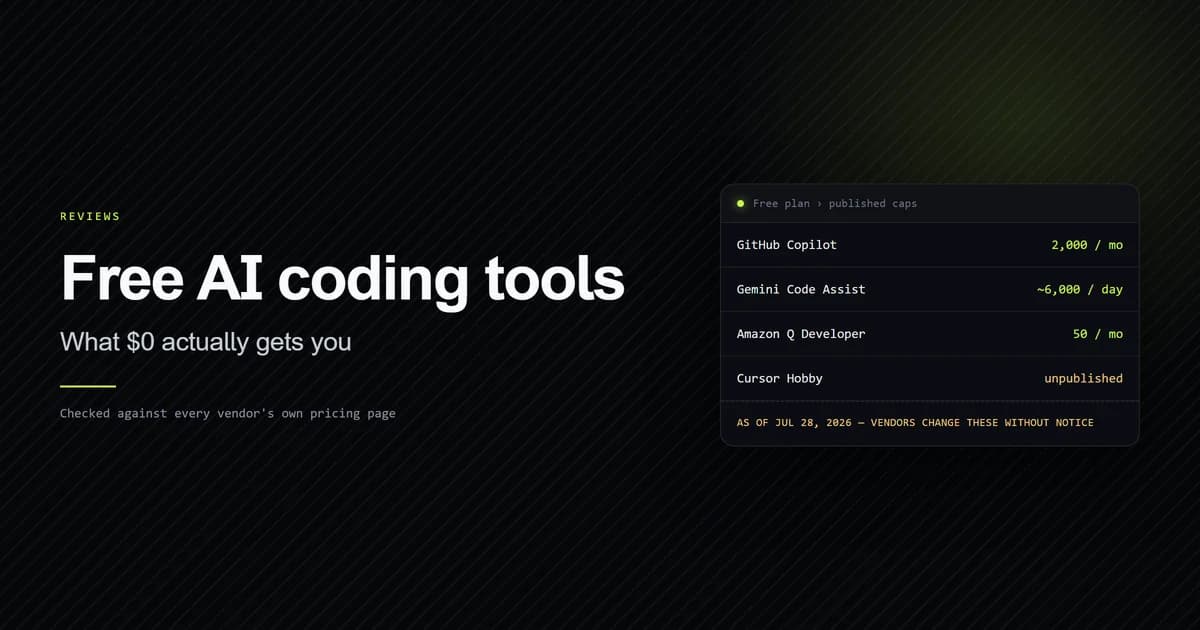
If you are billing clients rather than drawing a salary, the freelancer breakdown works the same arithmetic against irregular income, where the deciding variable is how many months a year you bill fewer than ten development days. And if $0 is a hard constraint rather than a preference, what the free tiers actually grant is the more direct read.
Team and enterprise pricing
Team pricing does not scale from individual pricing, and in two cases it inverts the recommendation entirely.
| Plan | Structure | Cost at 5 developers |
|---|---|---|
| Copilot Business | $19/seat | $95 |
| Copilot Enterprise | $39/seat | $195 |
| Cursor Teams Standard | $40/seat | $200 |
| Cursor Teams Premium | $120/seat | $600 |
| Claude Team Standard | $25/seat | $125 |
| Devin Teams | $80 base + $40/seat | $280 |
Copilot Business at $19 per granted seat is the cheapest managed team option here by a wide margin — roughly half of Cursor Teams Standard and a third of Devin's five-developer total. Note the wording: GitHub bills per granted seat, so a licence assigned to a developer who never opens the editor still bills.
Two structural details decide more than the per-seat number.
Copilot's individual tiers do not pool. GitHub's plans page lists pooled usage as "Not included" on Free, Pro, Pro+, and Max alike; it is an organisation feature. Five developers on five Pro seats hold five separate $15 allowances, and one developer exhausting theirs cannot draw on a colleague's unused balance. For teams with uneven usage — which is most teams — that is a real inefficiency the seat price does not show.
Devin's base fee never amortises away. Its team plan is "$80/month for team plan + $40/mo per full dev seat," so it costs $80 more than a flat $40-per-seat competitor at every team size. The three-editor comparison works that arithmetic out across team sizes, where it doubles the per-head cost at two developers and fades to about 10% at twenty.
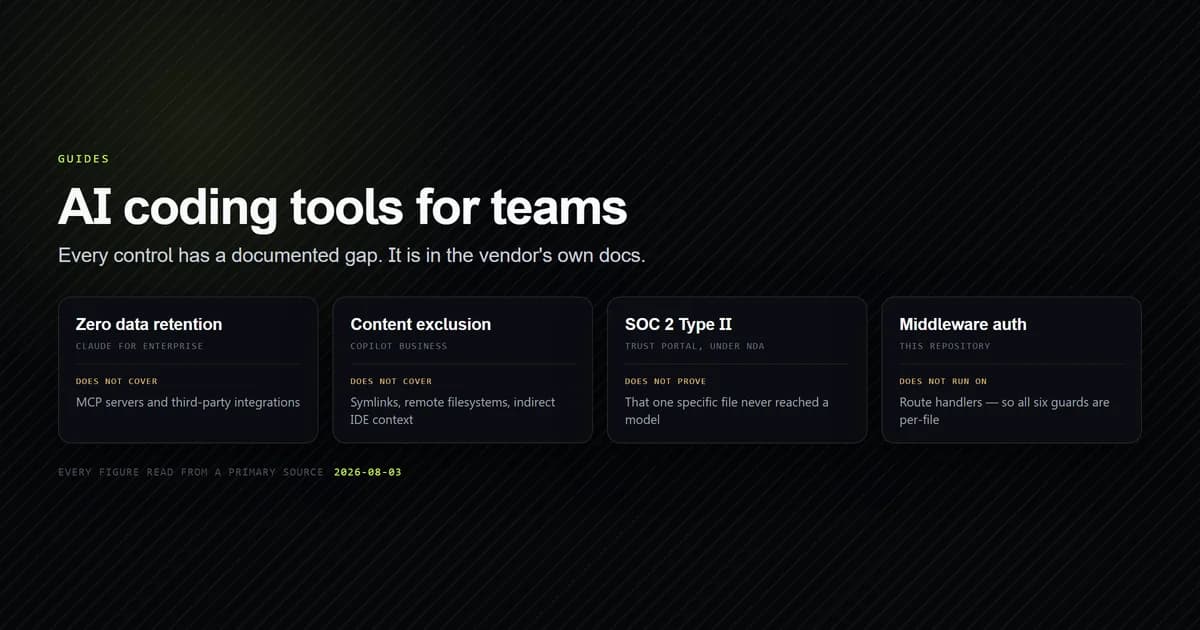
Above roughly ten developers, none of these differences survives contact with the compliance requirements. Zero-data-retention terms, content exclusion, SSO, and audit logging all sit on the top tier at every vendor, and the gaps each vendor documents in its own security pages will narrow your shortlist before pricing does. Buy on the control you need, then compare the prices of the plans that actually clear it.
How we check these numbers
Every figure on this page comes from the vendor's own page, read on August 4, 2026: GitHub's Copilot plans page and its organisation plan documentation, Cursor's documentation pricing page, Anthropic's Claude Code cost documentation, and Devin's pricing page.
Because a pricing article's failure mode is silent — a vendor edits a page, nothing in the build notices, and the article keeps asserting a number that is no longer true — the figures are committed to this repository as a snapshot and checked by a script rather than by memory.
npm run check:prices
# → check-prices — 6 source(s), 29 figures, snapshot read 2026-08-04
# →
# → ok           copilot-individual       10/10 figures still on the page
# → ok           copilot-organizations    2/2 figures still on the page
# → MANUAL       cursor                   6 figures — page is client-rendered
# → ok           anthropic-claude         4/4 figures still on the page
# → ok           claude-code-costs        3/3 figures still on the page
# → ok           devin                    4/4 figures still on the page
# →
# → 5/5 automated source(s) verified, 1 needing a manual check.
The script re-fetches each source and reports which recorded strings no longer appear. A hit means the exact figure is still on the page. A miss means "re-read this by hand" — it is not proof a price changed, because a reworded label, a client-rendered figure, and an actual price change all look identical to a string search.
What did not work, and why it is in the output. Cursor's documentation page returns 141,842 characters of HTML that reduce to 34 characters of text: every price is rendered client-side, so a fetch that does not execute JavaScript sees none of them. The first version of this check reported all six Cursor figures as drift on every run, which is worse than useless — a check that always fails is a check people stop reading. It now carries an explicit manual flag naming the reason, and the six Cursor figures on this page are the ones re-read by hand each quarter. There is a certain symmetry in the vendor whose prices are hardest to find also being the one that cannot be verified automatically.
Two further quirks are worth recording because they will bite anyone building the same thing. Stripping HTML tags turns <span>$80</span>/month into $80 /month and $<span>39</span> into $ 39, so needles copied from a rendered page never match until you normalise the space back out. And GitHub encodes its apostrophes as ', so "don't use credits" fails against a decoder that only handles '.
What this page is not. These are published list prices and one vendor's published deployment average. We have not run a controlled spend test across six products, and no invoice from Cursor, Copilot Business, or Devin backs any figure here — the first-hand work is the snapshot, the checker, and the arithmetic, all of which you can reproduce from the sources above. Our own sustained usage in this category is Claude Code, which built this site and is documented separately rather than generalised into a verdict about the others.
Common mistakes budgeting for AI coding tools
- Budgeting from the seat price. The seat buys an allowance. Anthropic's published range for real deployments is $150-250 per developer per month against a $20 seat, and no vendor's marketing page leads with a number like that.
- Treating Copilot's $15 as fixed. A third of it is a flex allotment GitHub states "may change over time." Budget the $10 base and treat flex as upside.
- Comparing Copilot Pro to Cursor Pro because both are entry tiers. They are not the same size. Match on included usage and the comparable pair is Copilot Pro+ against Cursor Pro Plus, where the gap is $21 a month.
- Reading Cursor's marketing pricing page and stopping. It describes Pro Plus as "3x Pro limits" and Ultra as "20x Pro limits" without listing either price. The figures are on the documentation pricing page, and a multiple of an undisclosed base is not a price.
- Assuming bring-your-own-key is always cheapest. Below about $10 a month of consumption it is. Above that, a $10 seat carrying a $15 allowance beats paying for tokens directly.
- Forgetting that BYOK still meters on Cursor Teams. The $0.25 per million token Cursor Token Rate applies to your own key, on top of the bill you are already paying your provider.
- Assuming individual seats pool across a team. They do not on Copilot — pooled usage is an organisation feature, listed as "Not included" on every individual tier.
Best practices
- Estimate X before you shop. Every recommendation on this page turns on your monthly model consumption in dollars. Run a week on any metered plan, read the usage page, and multiply. Choosing a tier before you know that number is guessing.
- Set a spend cap on day one. Every vendor here bills overage at undiscounted API rates, and the most expensive month any team has is the one where nobody had configured a ceiling.
- Budget the guaranteed component, not the headline. Copilot's base credits, not base plus flex. If the flex allotment survives, you are under budget, which is the correct direction to be wrong in.
- Match tiers on included usage, never on tier name. "Pro" means $10 of usage at one vendor and $20 at another. The names carry no information.
- Re-check quarterly and record the date. This category re-priced three times in the first half of 2026 and one product changed its name mid-year. Any figure without a date attached is a figure you cannot act on.
- Prefer completion-heavy work on Copilot. Completions do not consume credits on any paid plan, so the same seat costs materially less for a developer who mostly accepts inline suggestions than for one running agents all day.
Conclusion
If you are one developer buying for yourself, take Copilot Pro at $10: it is the only seat here that includes more model usage than it costs, and completions do not draw on the allowance at all. If your consumption is genuinely light — a few agent runs a week, under about $10 a month — skip the seat entirely and point Cline or Aider at your own key. If you are buying for a team, start at Copilot Business at $19 per granted seat and only move up when a specific compliance control forces it. And whichever you choose, budget against Anthropic's published $150-250 per developer per month rather than the seat price, then re-read every one of these pages next quarter, because at least one of them will have changed.
Frequently asked questions
What is the cheapest AI coding assistant?
Is Cursor or GitHub Copilot cheaper?
How much does Claude Code cost per developer per month?
Do code completions use up your AI credits on Copilot?
Why is Cursor's Pro Plus price hard to find?
What is the Cursor Token Rate?

Muhammad Kashif
Founder and editor of Devventa, covering AI coding assistants, Next.js and the modern AI development stack.